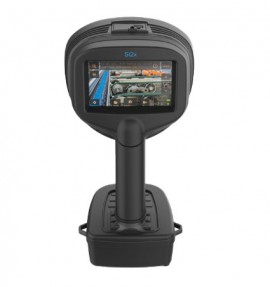
FLIR Si2x-Pro Acoustic Imaging Camera for partial discharge, leak, and bearing fault detection, 2 to 130 kHz, 1280 × 720

Model: Si2x-Pro | Order No: T912503 | UPC: 845188033507

FLIR Si2x-Pro Acoustic Imaging Camera for partial discharge, leak, and bearing fault detection, 2 to 130 kHz, 1280 × 720

Model: Si2x-Pro | Order No: T912503 | UPC: 845188033507

Designed for hazardous gas and explosive dust areas, this acoustic imaging camera helps reduce toxic or flammable gas leaks to improve safety and cut costs tied to compressed air or gas loss. Moreover, this camera offers tools for detecting partial discharge and mechanical bearing faults on electrical equipment, fleet management, and enterprise data integration.

Designed for hazardous gas and explosive dust areas, this acoustic imaging camera helps reduce toxic or flammable gas leaks to improve safety and cut costs tied to compressed air or gas loss. Moreover, this camera offers tools for detecting partial discharge and mechanical bearing faults on electrical equipment, fleet management, and enterprise data integration.

Your Price $31490.00 USD
Availability 2 to 3 Weeks
Quantity

FLIR Si2x-Pro Offers

The FLIR Si2x-Series series represents the most advanced acoustic performance and decision support available on the market today. The FLIR Si2x-Series series are ATEX certified acoustic cameras for hazardous locations. These cameras allow quantification of pressurized gas leakage, mechanical fault identification and partial discharge detection in explosive atmosphere.

ATEX certified for Zone 2 (gas), and Zone 22 (dust), the Si2x provides an effective, easy to use scalable ultrasound inspection tool that helps reduce energy costs and loss of productivity for Explosive Vapor and Explosive Dust environments.

Features

  • Detects, locates, and measures compressed gas leaks and mechanical issues in explosive atmospheres quickly and easily
  • Offers mechanical issue condition assessment with three measurement metrics for early identification of bearing problems to prevent costly downtime
  • Quantifies leak rate and cost of industrial gas and compressed air leaks, to prioritize repair and calculate savings
  • Includes on-camera and in-software severity assessment and type classification of partial discharge (PD) issues
  • Features automatic frequency tuning, 8x zoom, 12 MP digital camera, and a QR code reader
  • Offers fleet management functionality for efficient tool usage and maintenance across large-scale operations

Advanced Leak and Partial Discharge Detection

  • Precisely detect, locate, and measure compressed air leaks, gas leaks, and partial discharges. Identify and quantify both minor and elusive issues from up to 656' (200 m) away - boosting operational efficiency and ensuring safety.

Mechanical Fault Analysis

  • Save on costly repairs, reduce downtime, and enhance maintenance efficiency by identifying bearing and other mechanical defects before they overheat or cause equipment failure.

Fleet Management Functionality

  • Ensure optimal use and maintenance of equipment in large-scale industrial settings with fleet management, cloud data integration, and OTA software updates. Combine acoustic and thermal imaging in the same report.

Applications

  • Early leak detection
  • Quickly inspect zone 2
  • Faulty bearing detection

How to Update Your Si2 Camera

The Si1 and Si2-series cameras can be updated using Over The Air (OTA) update, or through USB. To update your camera through USB, please follow the instructions below. Make sure that you read all the steps before attempting the update.

Requirements:

  • Ensure that the battery is fully charged. You will not receive any warning or message before starting the update
  • To ensure a successful update installation, we recommend utilizing an unrestricted computer or workstation. This will help prevent any loss of information during the download or transfer process
  • Use the USB flash drive supplied with the camera and make sure that the drive is empty.
  • Disable the Wi-Fi on the device. Settings -> Network Settings -> Disable Wi-Fi

Instructions:

  • 1. Insert the USB stick into the USB port and wait for a couple of seconds (an hourglass/waiting icon appears on the screen)

Please make sure that the internal Si2 memory does not contain any snapshot files, otherwise the USB update will not start.

*NOTE: DO NOT remove the USB stick until the camera instructs you to remove it, see image on step nr 4.

  • 2. Wait until the following prompt message is displayed: "Update file detected. Apply? Yes or No", tap on Yes.
  • 3. An status message is shown: "Please wait. copying update file...", the update is in process, please wait for 15 minutes.
  • 4. Once the installation is completed, a confirmation message will appear: "Update copied. Remove the USB stick and restart the device to apply the update.", please tap OK
  • 5. Now you can restart the camera. To restart the camera, first turn it off by long-pressing the power button until it turns red. Wait until it the Red LED light stops glowing, then turn it back on by short-pressing the button until it turns green.

Installation:

  • 1. When turning on the camera, the device screen displays that the update is being installed
  • 2. Wait until the installation is completed, this process takes around 10 minutes
  • 3. The camera will display the FLIR logo, and then switch to the main screen (live view). The update has been now been installed successfully

*Note: If the mode selection at start up is enabled, the camera will display the mode selection screen first. Select a mode and then accept to be directed to the live view

Verification:

  • 1. To confirm that your camera software is up-to-date, look at the text box at the bottom of the screen after pressing the settings menu. The device info displays the latest version of the software
  • 2. The camera is ready for normal operation

If your camera currently has 25H1, follow the instructions in FLIR Customer Help – Option 1: Automatic Update Notification

If your camera has an older release than 25H1, follow the instructions in FLIR Customer Help – Step 2: Camera Update OTA

FLIR Si2x-Pro Specifications

Imaging Camera
Acoustic Measurement 124 low-noise MEMS microphones, real-time sound visualization
Severity Assessment Automatic AI-based partial discharge severity assessment including recommended actions onboard camera
Distance From 1 up to 656' (0.3 to 200 m)
Leak Rate 0.0032 l/min from 8.2' (2.5 m)
0.0044 l/min from 19.6' (6 m)
Wireless Data Transfer Wi-Fi 2.4 GHz and 5 GHz IEEE 802.11.b/g/n/ac wireless LAN
Camera software update Automatic Over The Air (OTA) wireless update or via USB connection
Field of view (FOV) 75° diagonal
Video Frame Rate Camera: 60 fps
Acoustic image: 30 fps
Screen: 70 fps
Video Image Resolution 1280 × 720
Zoom 8x Digital zoom
Measurement and Analysis
Acoustic Measurement 124 low-noise MEMS microphones, real-time sound visualization
Bandwidth 2 to 130 kHz
Detection Threshold 20 kHz: -8 dB SPL
35 kHz: 4 dB SPL
50 kHz: 13 dB SPL
80 kHz: 42 dB SPL
100 kHz: 58 dB SPL
Detects Following Gases Compressed air, nitrogen, ammonia, hydrogen, carbon dioxide, methane, helium, and argon
Mechanical Analysis Mechanical Sound Indicator (MSI) Confirmation, Sound Pressure Level (dB), Crest factor, Kurtosis factor
Severity Assessment Automatic AI-based partial discharge severity assessment including recommended actions onboard camera
User Interface
Display Size: 5" (12.7 cm)
Resistive touch screen, TFT LCD, MIPI DSI
Power
Battery Battery
Li-Ion rechargeable battery pack
Usage: up to 2.5 h
Charge time: approximately 2 h

Battery charger
Input: 19 to 26 V DC, 2.8 A
Maximum output: 17.4 V DC, 4.8 A

Weight: 0.55 lbs (0.25 kg), approximately
Nominal Input Voltage Nominal input voltage: 12 V DC
Maximum input: 17 V DC, 3.3 A (limited)
Environmental and Certifications
Explosive (hazardous) Environment Ex II 3 G Ex ic IIIC T4 Gc
Ex II 3 D Ex ic IIIC T135°C Dc
Tamb 14 to 104°F (-10 to 40°C)
Protection Class IP54
Environmental Conditions Operating and storage humidity: 0 to 90% recommended
Operating temperature range: 14 to 122°F (–10 to 50°C)
Storage temperature range: -4 to 158°F (-20 to 70°C)
General Specifications
Worklights LEDs, 2 modes: On/Off
Dimensions 7.2 × 10.8 × 6.5" (184 × 276 × 167 mm )
Weight 2.6 lbs (1.2 kg)
Click here for complete specifications on the FLIR Si2x-Pro

What's included with the FLIR Si2x-Pro

  • Acoustic Imaging Camera
  • Neck Strap
  • USB Memory Stick
  • Hard Carrying Case
  • 2 x Batteries
  • Battery Charger
  • 4 x Power Cables
  • Printed Documentation
  • License card: FLIR Si-series Plugin for FLIR Thermal Studio, Perpetual license

Ask a question about FLIR Si2x-Pro Acoustic Imaging Camera for partial discharge, leak, and bearing fault detection, 2 to 130 kHz, 1280 × 720

Customer Reviews for the FLIR Si2x-Pro

FLIR Si2x-Pro Offers

The FLIR Si2x-Series series represents the most advanced acoustic performance and decision support available on the market today. The FLIR Si2x-Series series are ATEX certified acoustic cameras for hazardous locations. These cameras allow quantification of pressurized gas leakage, mechanical fault identification and partial discharge detection in explosive atmosphere.

ATEX certified for Zone 2 (gas), and Zone 22 (dust), the Si2x provides an effective, easy to use scalable ultrasound inspection tool that helps reduce energy costs and loss of productivity for Explosive Vapor and Explosive Dust environments.

Features

  • Detects, locates, and measures compressed gas leaks and mechanical issues in explosive atmospheres quickly and easily
  • Offers mechanical issue condition assessment with three measurement metrics for early identification of bearing problems to prevent costly downtime
  • Quantifies leak rate and cost of industrial gas and compressed air leaks, to prioritize repair and calculate savings
  • Includes on-camera and in-software severity assessment and type classification of partial discharge (PD) issues
  • Features automatic frequency tuning, 8x zoom, 12 MP digital camera, and a QR code reader
  • Offers fleet management functionality for efficient tool usage and maintenance across large-scale operations

Advanced Leak and Partial Discharge Detection

  • Precisely detect, locate, and measure compressed air leaks, gas leaks, and partial discharges. Identify and quantify both minor and elusive issues from up to 656' (200 m) away - boosting operational efficiency and ensuring safety.

Mechanical Fault Analysis

  • Save on costly repairs, reduce downtime, and enhance maintenance efficiency by identifying bearing and other mechanical defects before they overheat or cause equipment failure.

Fleet Management Functionality

  • Ensure optimal use and maintenance of equipment in large-scale industrial settings with fleet management, cloud data integration, and OTA software updates. Combine acoustic and thermal imaging in the same report.

Applications

  • Early leak detection
  • Quickly inspect zone 2
  • Faulty bearing detection

How to Update Your Si2 Camera

The Si1 and Si2-series cameras can be updated using Over The Air (OTA) update, or through USB. To update your camera through USB, please follow the instructions below. Make sure that you read all the steps before attempting the update.

Requirements:

  • Ensure that the battery is fully charged. You will not receive any warning or message before starting the update
  • To ensure a successful update installation, we recommend utilizing an unrestricted computer or workstation. This will help prevent any loss of information during the download or transfer process
  • Use the USB flash drive supplied with the camera and make sure that the drive is empty.
  • Disable the Wi-Fi on the device. Settings -> Network Settings -> Disable Wi-Fi

Instructions:

  • 1. Insert the USB stick into the USB port and wait for a couple of seconds (an hourglass/waiting icon appears on the screen)

Please make sure that the internal Si2 memory does not contain any snapshot files, otherwise the USB update will not start.

*NOTE: DO NOT remove the USB stick until the camera instructs you to remove it, see image on step nr 4.

  • 2. Wait until the following prompt message is displayed: "Update file detected. Apply? Yes or No", tap on Yes.
  • 3. An status message is shown: "Please wait. copying update file...", the update is in process, please wait for 15 minutes.
  • 4. Once the installation is completed, a confirmation message will appear: "Update copied. Remove the USB stick and restart the device to apply the update.", please tap OK
  • 5. Now you can restart the camera. To restart the camera, first turn it off by long-pressing the power button until it turns red. Wait until it the Red LED light stops glowing, then turn it back on by short-pressing the button until it turns green.

Installation:

  • 1. When turning on the camera, the device screen displays that the update is being installed
  • 2. Wait until the installation is completed, this process takes around 10 minutes
  • 3. The camera will display the FLIR logo, and then switch to the main screen (live view). The update has been now been installed successfully

*Note: If the mode selection at start up is enabled, the camera will display the mode selection screen first. Select a mode and then accept to be directed to the live view

Verification:

  • 1. To confirm that your camera software is up-to-date, look at the text box at the bottom of the screen after pressing the settings menu. The device info displays the latest version of the software
  • 2. The camera is ready for normal operation

If your camera currently has 25H1, follow the instructions in FLIR Customer Help – Option 1: Automatic Update Notification

If your camera has an older release than 25H1, follow the instructions in FLIR Customer Help – Step 2: Camera Update OTA

FLIR Si2x-Pro Specifications

Imaging Camera
Acoustic Measurement 124 low-noise MEMS microphones, real-time sound visualization
Severity Assessment Automatic AI-based partial discharge severity assessment including recommended actions onboard camera
Distance From 1 up to 656' (0.3 to 200 m)
Leak Rate 0.0032 l/min from 8.2' (2.5 m)
0.0044 l/min from 19.6' (6 m)
Wireless Data Transfer Wi-Fi 2.4 GHz and 5 GHz IEEE 802.11.b/g/n/ac wireless LAN
Camera software update Automatic Over The Air (OTA) wireless update or via USB connection
Field of view (FOV) 75° diagonal
Video Frame Rate Camera: 60 fps
Acoustic image: 30 fps
Screen: 70 fps
Video Image Resolution 1280 × 720
Zoom 8x Digital zoom
Measurement and Analysis
Acoustic Measurement 124 low-noise MEMS microphones, real-time sound visualization
Bandwidth 2 to 130 kHz
Detection Threshold 20 kHz: -8 dB SPL
35 kHz: 4 dB SPL
50 kHz: 13 dB SPL
80 kHz: 42 dB SPL
100 kHz: 58 dB SPL
Detects Following Gases Compressed air, nitrogen, ammonia, hydrogen, carbon dioxide, methane, helium, and argon
Mechanical Analysis Mechanical Sound Indicator (MSI) Confirmation, Sound Pressure Level (dB), Crest factor, Kurtosis factor
Severity Assessment Automatic AI-based partial discharge severity assessment including recommended actions onboard camera
User Interface
Display Size: 5" (12.7 cm)
Resistive touch screen, TFT LCD, MIPI DSI
Power
Battery Battery
Li-Ion rechargeable battery pack
Usage: up to 2.5 h
Charge time: approximately 2 h

Battery charger
Input: 19 to 26 V DC, 2.8 A
Maximum output: 17.4 V DC, 4.8 A

Weight: 0.55 lbs (0.25 kg), approximately
Nominal Input Voltage Nominal input voltage: 12 V DC
Maximum input: 17 V DC, 3.3 A (limited)
Environmental and Certifications
Explosive (hazardous) Environment Ex II 3 G Ex ic IIIC T4 Gc
Ex II 3 D Ex ic IIIC T135°C Dc
Tamb 14 to 104°F (-10 to 40°C)
Protection Class IP54
Environmental Conditions Operating and storage humidity: 0 to 90% recommended
Operating temperature range: 14 to 122°F (–10 to 50°C)
Storage temperature range: -4 to 158°F (-20 to 70°C)
General Specifications
Worklights LEDs, 2 modes: On/Off
Dimensions 7.2 × 10.8 × 6.5" (184 × 276 × 167 mm )
Weight 2.6 lbs (1.2 kg)
Click here for complete specifications on the FLIR Si2x-Pro

What's included with the FLIR Si2x-Pro

  • Acoustic Imaging Camera
  • Neck Strap
  • USB Memory Stick
  • Hard Carrying Case
  • 2 x Batteries
  • Battery Charger
  • 4 x Power Cables
  • Printed Documentation
  • License card: FLIR Si-series Plugin for FLIR Thermal Studio, Perpetual license

Ask a question about FLIR Si2x-Pro Acoustic Imaging Camera for partial discharge, leak, and bearing fault detection, 2 to 130 kHz, 1280 × 720

Customer Reviews for the FLIR Si2x-Pro

More FLIR Products