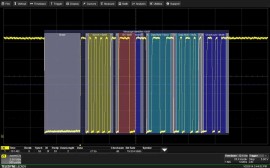
Provide high-performance triggers and transparent color-coded decode overlays, protocol tables, and search capabilities, along with Measure/Graph (M) with automated measurement and graphing tools, and Eye Diagram (E) for physical layer signal assessment and debug for both CAN and CAN FD to the T3DSO2000A series oscilloscopes.
Discontinued!
This product has been discontinued and is no longer available. There are no replacement options.
We can help you find what you need:
Features
Conditional DATA trigger setup ("T")
The trigger permits a conditional (<, <=, =, >, >=, <>, inside a range, outside a range) setup for the DATA condition. This is especially useful in situations where abnormal events should be monitored, such as when a CAN node broadcasts a low or high engine RPM or coolant pressure.
Trigger flexibly across data bytes ("T")
CAN remains the most used vehicle serial data bus. Many vehicle bus software architectures are very message dense, and data for a single message is spread across multiple data bytes. The hexadecimal and measurement toolsets permit isolation of specific bit-level data patterns in one or more data bytes, e.g., data location in bits 17-28 in data bytes 3, 4, and 5. This provides significant advantages in isolating the exact information or behavior you need. Symbolic message/signal setup is even simpler.
Intuitive, color-coded decode overlays ("D")
A transparent overlay with color-coding for specific portions of each protocol and the entire message frame makes it easy to understand your serial data information. Unlike other solutions, with protocol decode information away from the signal, our solution correlates the waveform and the protocol decode directly on the display. As the acquisition length is expanded or shortened, the decode overlay will adjust to show you just the right amount of information.
Symbolic trigger, decoding and measure/graph ("Symbolic")
CAN Symbolic options support use of a customer-supplied DBC file for signal selection for triggering and CAN to Value serial data DAC setup. Additionally, the decode annotation is in Symbolic format as well, with complete message and signal structures described.
Interactive table summarizes results ("D")
Turn the oscilloscope into a protocol analyzer with a tabular display of decoded information. Customize the table to show only the data of interest and touch a message in the table to automatically zoom to it and display it on the screen. Export the table for offline analysis. Up to four different decoded signals of any type may be simultaneously displayed in the table.
Measure/graph tools for validation efficiency ("M")
Quickly validate cause and effect with automated timing measurements to or from an analog signal or another serial message. Make multiple measurements in a single long acquisition to quickly acquire statistics during corner-case testing. Serial (digital) data can be extracted to an analog value and graphed to monitor system performance over time, as if it was probed directly. Complete validation faster and gain better insight.
Eye diagrams ("P")
Rapidly display an eye diagram of your packetized low-speed serial data signal without additional setup time. Use eye parameters to quantify system performance and apply a standard or custom mask to identify anomalies. Mask failures can be indicated and can force the scope into Stop mode.
| Trigger Capability | |
| Format | Hexadecimal or Binary ID and DATA can be set up with different formats |
| Trigger Setup | Trigger on ID, ID+DATA, REMOTE, ERROR, or ALL (Data, Remote, or Error Frame) frames Set Requested (Bit) Sampling Point from 20 to 90% (Basic) or set values for Prop Seg, Phase_Seg1, Phase_Seg2, and SJW for (Advanced) |
| ID Setup | Hexadecimal or Binary: Specify STD (11-bit) or EXT (29-bit) ID(s) with condition of <=, <, =, >, >=, <>, IN RANGE, OUT OF RANGE, or DON'T CARE Supports triggering when both 11-bit and 29-bit IDs are present on the bus |
| DATA Setup | Hexadecimal: # Data Bytes = 0 to 8 (CAN) or 0-12. (CAN FD) Data bytes can be defined by nibble Binary: Any combination of 0,1, or X for 1-64 (CAN) or 0-96 (CAN FD) bits Data pattern can be any length and can be set to start at any location in the up to 8 (CAN) or 12 (CAN FD) Byte / 64 (CAN) or 96 (CAN FD) bit sequence. Byte Order Intel or Motorola format, Signed or Unsigned Data |
| DATA Condition Setup | <=, <, =, >, >=, <>, IN RANGE, OUT OF RANGE, or DON'T CARE |
| Error Frame Setup | Select any combination of All Error Frames, Stuff Bit Errors, CRC Mismatch Errors. In CAN FDbus, also select Stuffbit Counter Error and Stuffbit Counter Parity Error |
| Remote Frame Setup | Supported for ID. Capability identical to ID Condition Setup |
| Bit Rates | Nominal Bit Rate: 10, 25, 33.333, 50, 83.333, 100, 125, 250, 500 kb/s, or 1 Mb/s pre-defined nominal values, or user-defined from 10 kb/s to 1 Mb/s CAN FD Data Bit Rate: 0.5, 1.0, 1.5, 2.0, 5.0, 8.0, or 10 Mb/s pre-defined nominal values, or user-defined to any nominal value from 0.5 to 10 Mb/s |
| Trigger Input | Any analog Channel or Digital input, or the EXT input |
| Decode + Search Capability | |
| Format | Hexadecimal |
| Decode Setup | Threshold definition required. Default is to Percent amplitude. Select bit rate(s) |
| Decode Input | Any analog Channel, Memory or Math trace, and any Digital trace |
| Number of Decodes | Up to 4 buses may be decoded at one time. In addition, zooms can be displayed (with decoded information) |
| Visual Aid | Color Coding for FRAME, ID, IDE, EDL, BRS, ESI, RTR, DLC, DATA, CRC, ACK, STUFF BITS, BIT INDEX, and ERRORS. Error Frames are decoded whenever possible, with uncorrupted portions decoded to Identify Type. Decode information is intelligently annotated based on timebase setting, and overlaid on acquired waveform |
| Table Configure, Export Table | Display 1 to 20 rows of decoded information for up to 4 different protocols or decodes in time order in a single table. Displayed information includes Index, Timestamp, and other various protocol-specific information. Table permits scrolling, touch to zoom, export to .csv file, and special display of long data or other patterns |
| Pattern Search | Search for Previous or Next Index, ID, IDE, DLC, DATA, and STATUS |
| Trigger Capability | |
| Format | Hexadecimal or Binary ID and DATA can be set up with different formats |
| Trigger Setup | Trigger on ID, ID+DATA, REMOTE, ERROR, or ALL (Data, Remote, or Error Frame) frames Set Requested (Bit) Sampling Point from 20 to 90% (Basic) or set values for Prop Seg, Phase_Seg1, Phase_Seg2, and SJW for (Advanced) |
| ID Setup | Hexadecimal or Binary: Specify STD (11-bit) or EXT (29-bit) ID(s) with condition of <=, <, =, >, >=, <>, IN RANGE, OUT OF RANGE, or DON'T CARE Supports triggering when both 11-bit and 29-bit IDs are present on the bus |
| DATA Setup | Hexadecimal: # Data Bytes = 0 to 8 (CAN) or 0-12. (CAN FD) Data bytes can be defined by nibble Binary: Any combination of 0,1, or X for 1-64 (CAN) or 0-96 (CAN FD) bits Data pattern can be any length and can be set to start at any location in the up to 8 (CAN) or 12 (CAN FD) Byte / 64 (CAN) or 96 (CAN FD) bit sequence. Byte Order Intel or Motorola format, Signed or Unsigned Data |
| DATA Condition Setup | <=, <, =, >, >=, <>, IN RANGE, OUT OF RANGE, or DON'T CARE |
| Error Frame Setup | Select any combination of All Error Frames, Stuff Bit Errors, CRC Mismatch Errors. In CAN FDbus, also select Stuffbit Counter Error and Stuffbit Counter Parity Error |
| Remote Frame Setup | Supported for ID. Capability identical to ID Condition Setup |
| Bit Rates | Nominal Bit Rate: 10, 25, 33.333, 50, 83.333, 100, 125, 250, 500 kb/s, or 1 Mb/s pre-defined nominal values, or user-defined from 10 kb/s to 1 Mb/s CAN FD Data Bit Rate: 0.5, 1.0, 1.5, 2.0, 5.0, 8.0, or 10 Mb/s pre-defined nominal values, or user-defined to any nominal value from 0.5 to 10 Mb/s |
| Trigger Input | Any analog Channel or Digital input, or the EXT input |
| Decode + Search Capability | |
| Format | Hexadecimal |
| Decode Setup | Threshold definition required. Default is to Percent amplitude. Select bit rate(s) |
| Decode Input | Any analog Channel, Memory or Math trace, and any Digital trace |
| Number of Decodes | Up to 4 buses may be decoded at one time. In addition, zooms can be displayed (with decoded information) |
| Visual Aid | Color Coding for FRAME, ID, IDE, EDL, BRS, ESI, RTR, DLC, DATA, CRC, ACK, STUFF BITS, BIT INDEX, and ERRORS. Error Frames are decoded whenever possible, with uncorrupted portions decoded to Identify Type. Decode information is intelligently annotated based on timebase setting, and overlaid on acquired waveform |
| Table Configure, Export Table | Display 1 to 20 rows of decoded information for up to 4 different protocols or decodes in time order in a single table. Displayed information includes Index, Timestamp, and other various protocol-specific information. Table permits scrolling, touch to zoom, export to .csv file, and special display of long data or other patterns |
| Pattern Search | Search for Previous or Next Index, ID, IDE, DLC, DATA, and STATUS |