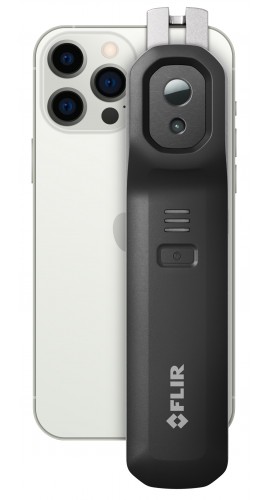
Innovative and rugged, this wireless IR camera connects to a Smart device to remotely inspect hard-to-reach targets and produces enhanced thermal images with VividIR and MSX technology. In addition, it allows one-handed operation with a natural grip in any position or angle and has an IR resolution of 160 x 120.
Innovative and rugged, this wireless IR camera connects to a Smart device to remotely inspect hard-to-reach targets and produces enhanced thermal images with VividIR and MSX technology. In addition, it allows one-handed operation with a natural grip in any position or angle and has an IR resolution of 160 x 120.
 Description
 Specifications
 Included
 Family Comparison
 Videos
 Resources
 Accessories
 Ask an Expert
 Customer Reviews
Compatible with iOS and Android smartphones and tablets, this wireless IR camera can effortlessly upload images and videos to the cloud to edit, organize, store, and share data.
Features
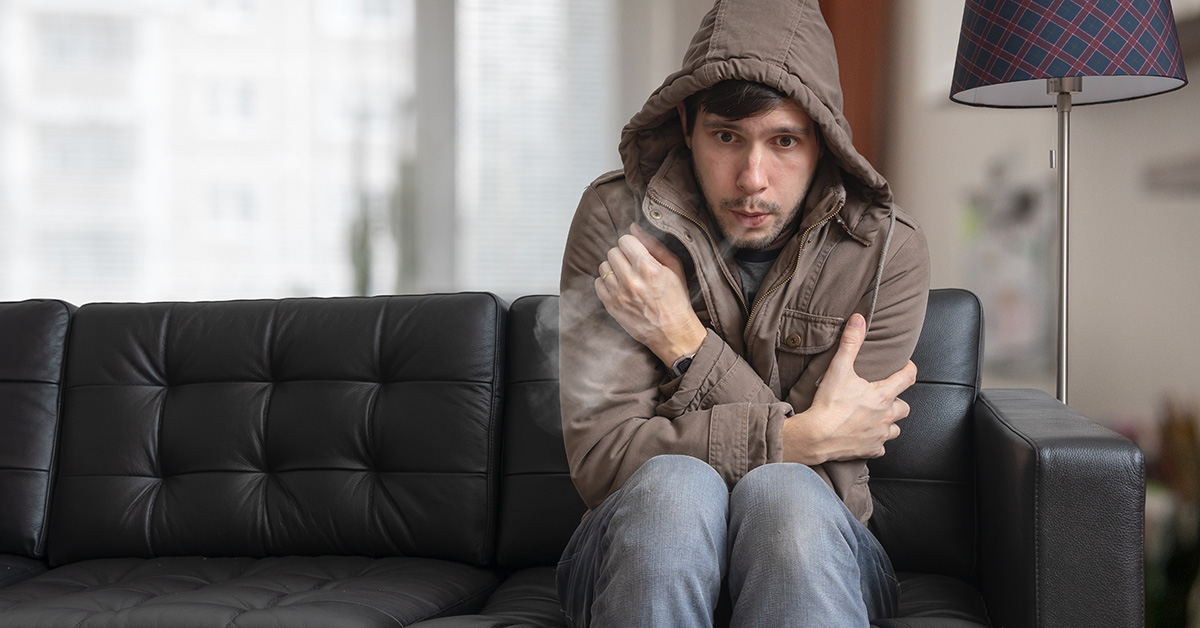
Making simple repairs around the home can greatly improve energy efficiency and save homeowners a great deal of money every winter, year after year.
For homeowners and contractors alike, taking the time to scan a home with thermal imaging is win-win and can be done in minutes without the need for significant investments or thermography expertise.
Here are some quick tips for conducting a basic home energy inspection.
Ideally, the homeowner will want to have potential energy inefficiencies in the home identified and fixed before the weather really gets cold. However, it is easier to locate places where hot air is escaping—around doors, windows, attics, and anywhere wires and cables enter the home—when there's a significant difference between indoor and outdoor temperatures.
Simply sealing gaps within these common problem areas can save the homeowner up to 20% annually on energy bills each year. For those who experience hot summers, those same winter fixes could help improve cooling efficiency during the warmer months, further compounding energy cost savings throughout most of the year.
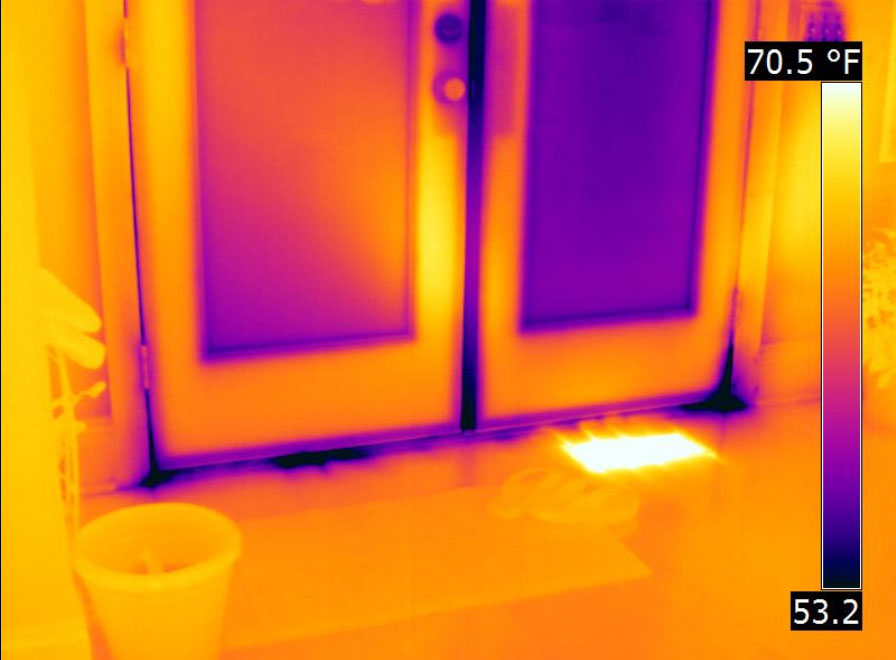
One of the easiest places to check for potential cold-air leaks—and also to remedy—is weather stripping around windows and doors. Having the ability to check those spots, especially on an unusually chilly day in the fall, can help uncover what windows and doors truly need new sealing materials before the coldest days arrive.
If a leak by a window or door is large enough and the air is cold enough outside, one can easily feel the air leak with their hand. Those problems can comprise an additional 10 to 20% of total home energy loss. Thermal imaging equipment is particularly adept at detecting places of missing insulation or insulation that has moved within the home, including the ceiling.
For homeowners, one of the FLIR ONE camera models makes an excellent choice. Homeowners can rely on thermal imaging tools to help them deal with water intrusion or common pests who build homes in the walls, crawlspaces, or even siding.
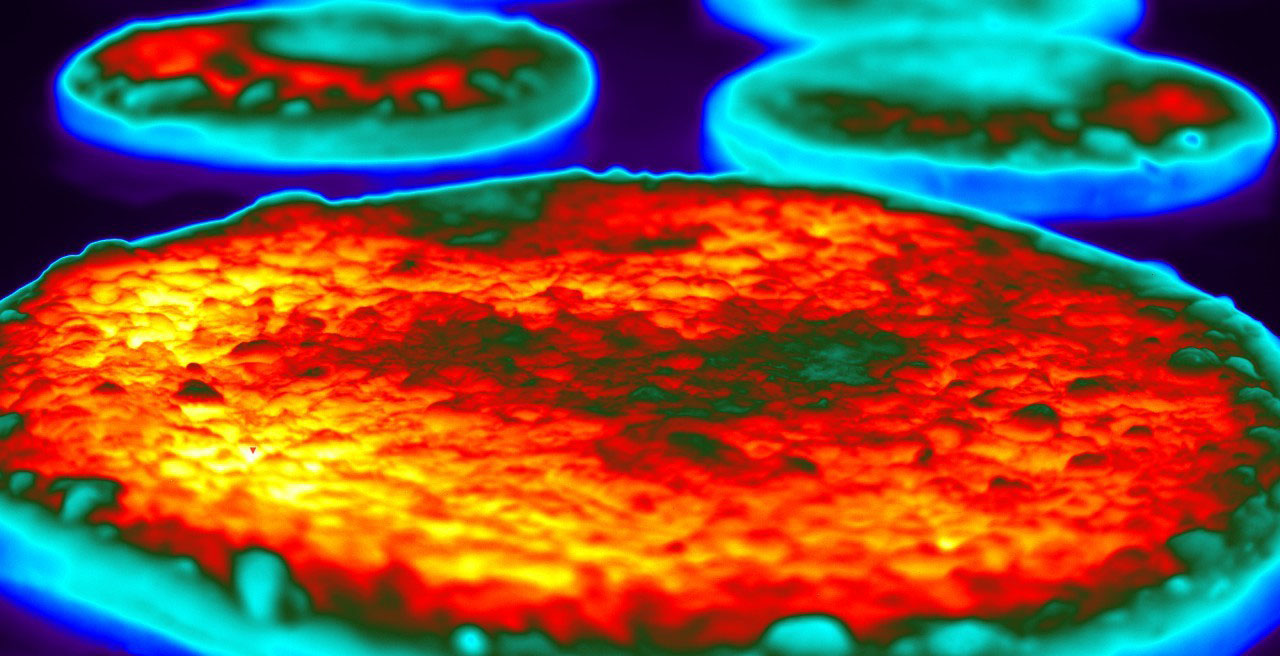
In the food industry, it’s essential to carefully control the temperature of perishable goods throughout production, transportation, storage, and sales. Food processors need tools that automate crucial operations in a way that helps minimize human error while holding down costs.
Using FLIR thermal imaging cameras, you can make automated non-contact temperature measurements in many food processing applications. Analog video outputs can be viewed on video monitors, and digital temperature data, including MPEG4 video outputs, can be routed to a computer via Ethernet.
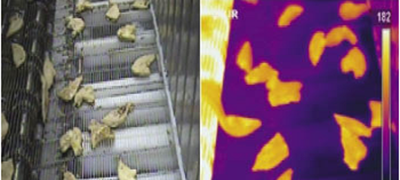
Thermal imaging cameras are easy to use, small, and can be positioned almost anywhere as needed. They can also be used to inspect package sealing, and improve efficiency in other food processing operations.
FLIR thermal imaging cameras have firmware and communication interfaces that enable their use in automated process control. Third-party software makes it easy to incorporate these tools into automated machine vision systems without the need for extensive custom-written control code.
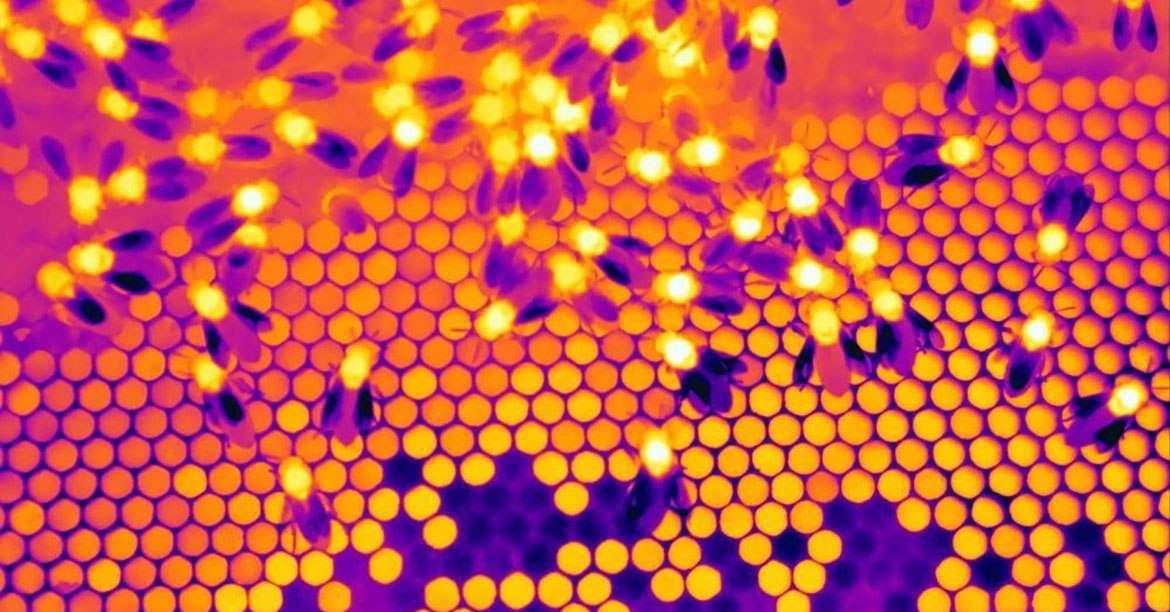
Beekeepers are increasingly turning to thermal imaging to help them care for their bees, especially during winter.
Beekeepers obviously want to avoid opening the hive in winter and losing all the heat that’s inside. But it’s still important to check on the bees. In summertime, bees are scattered throughout the hive, busy with making honey and feeding the young. But in the winter, they gather together in a tight knot called a “cluster” to stay warm. This cluster shows up as a hotspot that can be seen from outside the hive using a thermal camera like the FLIR ONE.
In wintertime, bees start at the bottom of the hive and eat their way up through their honey stores. When they reach the top, it means they’re out of food. Luckily, with the FLIR ONE you are able to see when hives need emergency food.
It’s best to take pictures from multiple sides of the hive to help pinpoint exactly where the bees are, and monitor hives over time to keep track of where the cluster is and how it’s moving, growing, shrinking or disappearing over the winter.
However, it’s not always that easy to see the cluster, as thermal imaging depends on there being a temperature difference to get a clear visual. Even in the winter, sunlight may heat up the outside of a beehive, making the colony inside effectively invisible. Taking thermal pictures before sunrise is a great way around this, as thermal imagers require no visible light to function.
Thermal imaging cameras for beekeeping are also useful in the summertime. You can take a picture early in the morning while the outside temperature is still cold and get a good picture whenever the internal hive temperature is warmer than the outside. You can use the thermal cameras in the desert at night as well (when it gets cold) and see heat escaping from the bottom of the hive and reflecting off the sand.

Elevated skin temperature screening and its key role in the fight against COVID-19: Realizing the difference between skin temperature and a raised body temperature caused by fever is a key first step towards implementing a non-contact screening solution. Using thermal imaging cameras to detect elevated skin temperatures helps industrial spaces, government facilities, and small businesses safeguard the health of employees and visitors. Understanding the purpose of elevated skin temperature screening, recognizing its limitations, and capturing accurate measurements are elemental in returning to work safely.

COVID-19 and other viral diseases often trigger fever in humans, which raises body temperature as an immune response to infection. While all fevers elevate body temperature, not all increases in body temperature are due to an immune response. Elevated body temperature remains one of the more telling signs that an individual may be fighting infection. When it comes to accurately measuring body temperature for medical purposes, a dedicated medical device, such as an internal thermometer, is required.
Skin temperature is primarily influenced by body temperature and is one of the most accessible indicators of an immune response. Infrared technology makes non-contact, socially-distanced skin temperature screening possible. Under the right conditions, thermal screening for elevated skin temperature is a fast, safe method to detect individuals that may be experiencing an abnormally high body temperature or fever.
One of the most important details for accurate skin temperature measurements is to focus on the corner of the eye. Research has shown that the corner of the eye—the region medially adjacent to the inner canthus—provides a more accurate estimate of core body temperature than other areas of skin because skin at the canthi is thin (decreasing insulating effects), is less exposed to environmental factors, and is directly over major arteries which increase blood flow and heat transfer.
Easily inspect anywhere
Measure targets in difficult-to-reach areas from any angle, and enhance visibility through remote monitoring.
Easily inspect anywhere
High-quality images and performance
Inspect areas accurately with FLIR proprietary image enhancement features.
High-quality images and performance
Enhance your way of working
Improve efficiency and large enterprise scalability with the unit and its apps and services.
Enhance your way of working
Applications
Professionals and non-professionals alike can enjoy the benefits of this camera because of its versatility and ease of use.
From your home to large manufacturing plants, discover a few ways this camera can help you get a clearer picture of the thermal situation around you. Get access to detailed application notes on how this thermal imaging camera is the right tool for the task.
Application Notes Application Notes| Specifications | |
| Native thermal resolution | 160 × 120 (19,200 pixels) |
| Super resolution | 480 × 360 |
| Object temperature ranges | -20 to 120°C (-4 to 248°F); 0 to 400°C (32 to 752°F) |
| VividIR image enhancement | Yes |
| Image presentation modes | MSX, infrared image, visual image |
| Live measurement analysis | Hottest, coldest, and 3 adjustable spots |
| Android & iOS compatibility | Compatible with both iOS and Android devices |
| Wireless remote operation | Up to 5 m from smart device |
| General Features | |
| Device compatibility | iOS 15 or later or Android 11 or later smartphones and tablets |
| IP rating | IP54 |
| Drop tested | Drop from 2 m (6.56 ft) |
| FLIR software compatibility | Flir One app, Flir Ignite, Flir Thermal Studio |
| SDK available for app development | Yes |
| Thermal sensitivity | 70 mK |
| Certifications | RoHS, CE/FCC, CEC-BC, EN62133, UL1642, WEEE 2012/19/EU |
| Operating temperature | -10 to 50°C (14 to 122°F); battery charging: 0 to 45°C (32 to 113°F) |
| Storage temperature | -40 to 70°C (-40 to 158°F) |
| Size (w × h × d) | 35 × 37.5 × 149 mm (1.4 × 1.5 × 5.9") |
| Weight (including battery) | 153 g (5.4 oz) |
| Clip span | 130 mm (min) / 195 mm (max) |
| Optical Data | |
| Spectral range | 8 to 14 μm |
| Visual resolution | 640 × 480 |
| HFOV / VFOV | 54° ±1° / 42° ±1° |
| Frame rate | 8.7 Hz |
| Focus | Fixed, 30 cm to infinity |
| Measurement | |
| Accuracy | ±3°C (5.4°F) or ±5%. Applicable 60 seconds after start-up when the unit is within 15 to 35°C (59 to 95°F) and the scene is within 5 to 120°C (41 to 248°F) |
| Emissivity correction | Matte, Semi-Matte, Semi-Glossy, Glossy |
| Measurement correction | Emissivity; reflected apparent temperature (22°C / 72°F) |
| Shutter | Automatic/Manual |
| Power | |
| Battery life | 2 h 30 min |
| Battery charge time | 60–90 minutes for a full charge. Charging an empty battery for 15 minutes gives 40 minutes of operating time |
| Interfaces | |
| Wi-Fi | 802.11 a/b/g/n |
| Bluetooth | Used to set up the peer-to-peer Wi-Fi network created by the camera to connect to the mobile device |
| Charging | Female USB-C (5V/1A) |
| Remote connection | Via Wi-Fi |
| App | |
| Video and image capture | Yes |
| File formats | Radiometric JPG, MPEG-4 (MOV on iOS, MP4 on Android) |
| Spot measurements | Hottest, coldest, and 3 spot measurements |
| Adjustable MSX distance | 0.3 m to infinity |
| Visual battery indicator | 0% to 100% |
| Radio | |
| Wi-Fi | Standard: 802.11 a/ac/b/g/n; frequency ranges: 2401–2473 MHz and 5150–5250 MHz; maximum output power: 15 dBm |
| Bluetooth | Frequency range: 2400–2484 MHz; maximum output power: 10 dBm |
 |
 |
|
|
Model |
EDGE PRO |
PROAndroid USB-CAndroid Micro-USB iOS |
PRO LTiOSAndroid |
|---|---|---|---|
| Thermal Resolution | 160 × 120 native resolution (19,200 pixels) 480 × 360 super resolution |
160 × 120 thermal resolution (19,200 pixels) | 80 × 60 thermal resolution (4,800 pixels) |
| Thermal Sensitivity | 70 mK | 70 mK | 100 mK |
| Temperature | Up to 752°F (400°C) | Up to 752°F (400°C) | Up to 248°F (120°C) |
| Image Modes | MSX, infrared, and visual | MSX, infrared, and visual | MSX, infrared, and visual |
| Image Enhancement | VividIR image enhancement | VividIR image enhancement | VividIR image enhancement |
| 3 Adjustable Measurement Spots | |||
| Detachable | Detachable wireless design for remote inspections up to 5 m from the smart device | ||
| Compatibility | iOS 15+ or Android 11+ smartphones and tablets | Choose iOS or Android version | Choose iOS or Android version |
| Drop Test | 6.56’ (2 m) | 5.9’ (1.8 m) | 5.9’ (1.8 m) |
| Battery Life | 2 h 30 min | 1 hour | 1 hour |
Click on a category to view a selection of compatible accessories with the FLIR Edge Pro Thermal Imaging Camera with Ignite for iOS and Android, 160 x 120, -4 to 752°F.

| Specifications | |
| Native thermal resolution | 160 × 120 (19,200 pixels) |
| Super resolution | 480 × 360 |
| Object temperature ranges | -20 to 120°C (-4 to 248°F); 0 to 400°C (32 to 752°F) |
| VividIR image enhancement | Yes |
| Image presentation modes | MSX, infrared image, visual image |
| Live measurement analysis | Hottest, coldest, and 3 adjustable spots |
| Android & iOS compatibility | Compatible with both iOS and Android devices |
| Wireless remote operation | Up to 5 m from smart device |
| General Features | |
| Device compatibility | iOS 15 or later or Android 11 or later smartphones and tablets |
| IP rating | IP54 |
| Drop tested | Drop from 2 m (6.56 ft) |
| FLIR software compatibility | Flir One app, Flir Ignite, Flir Thermal Studio |
| SDK available for app development | Yes |
| Thermal sensitivity | 70 mK |
| Certifications | RoHS, CE/FCC, CEC-BC, EN62133, UL1642, WEEE 2012/19/EU |
| Operating temperature | -10 to 50°C (14 to 122°F); battery charging: 0 to 45°C (32 to 113°F) |
| Storage temperature | -40 to 70°C (-40 to 158°F) |
| Size (w × h × d) | 35 × 37.5 × 149 mm (1.4 × 1.5 × 5.9") |
| Weight (including battery) | 153 g (5.4 oz) |
| Clip span | 130 mm (min) / 195 mm (max) |
| Optical Data | |
| Spectral range | 8 to 14 μm |
| Visual resolution | 640 × 480 |
| HFOV / VFOV | 54° ±1° / 42° ±1° |
| Frame rate | 8.7 Hz |
| Focus | Fixed, 30 cm to infinity |
| Measurement | |
| Accuracy | ±3°C (5.4°F) or ±5%. Applicable 60 seconds after start-up when the unit is within 15 to 35°C (59 to 95°F) and the scene is within 5 to 120°C (41 to 248°F) |
| Emissivity correction | Matte, Semi-Matte, Semi-Glossy, Glossy |
| Measurement correction | Emissivity; reflected apparent temperature (22°C / 72°F) |
| Shutter | Automatic/Manual |
| Power | |
| Battery life | 2 h 30 min |
| Battery charge time | 60–90 minutes for a full charge. Charging an empty battery for 15 minutes gives 40 minutes of operating time |
| Interfaces | |
| Wi-Fi | 802.11 a/b/g/n |
| Bluetooth | Used to set up the peer-to-peer Wi-Fi network created by the camera to connect to the mobile device |
| Charging | Female USB-C (5V/1A) |
| Remote connection | Via Wi-Fi |
| App | |
| Video and image capture | Yes |
| File formats | Radiometric JPG, MPEG-4 (MOV on iOS, MP4 on Android) |
| Spot measurements | Hottest, coldest, and 3 spot measurements |
| Adjustable MSX distance | 0.3 m to infinity |
| Visual battery indicator | 0% to 100% |
| Radio | |
| Wi-Fi | Standard: 802.11 a/ac/b/g/n; frequency ranges: 2401–2473 MHz and 5150–5250 MHz; maximum output power: 15 dBm |
| Bluetooth | Frequency range: 2400–2484 MHz; maximum output power: 10 dBm |
|
|
|
|
Model |
EDGE PRO |
PROAndroid USB-CAndroid Micro-USB iOS |
PRO LTiOSAndroid |
|---|---|---|---|
| Thermal Resolution | 160 × 120 native resolution (19,200 pixels) 480 × 360 super resolution |
160 × 120 thermal resolution (19,200 pixels) | 80 × 60 thermal resolution (4,800 pixels) |
| Thermal Sensitivity | 70 mK | 70 mK | 100 mK |
| Temperature | Up to 752°F (400°C) | Up to 752°F (400°C) | Up to 248°F (120°C) |
| Image Modes | MSX, infrared, and visual | MSX, infrared, and visual | MSX, infrared, and visual |
| Image Enhancement | VividIR image enhancement | VividIR image enhancement | VividIR image enhancement |
| 3 Adjustable Measurement Spots | |||
| Detachable | Detachable wireless design for remote inspections up to 5 m from the smart device | ||
| Compatibility | iOS 15+ or Android 11+ smartphones and tablets | Choose iOS or Android version | Choose iOS or Android version |
| Drop Test | 6.56’ (2 m) | 5.9’ (1.8 m) | 5.9’ (1.8 m) |
| Battery Life | 2 h 30 min | 1 hour | 1 hour |
Click on a category to view a selection of compatible accessories with the FLIR Edge Pro Thermal Imaging Camera with Ignite for iOS and Android, 160 x 120, -4 to 752°F.